Why tsconfig.json Allows Comments and package.json Does Not
Both files end in .json. One accepts comments and trailing commas, the other throws. The difference is not the extension - it is which parser reads the file.
Two files sit in the root of the same repository. Both end in .json. One of them is full of // comments explaining why each compiler flag is set, and your editor is perfectly happy about it. Add a single comment to the other and npm install dies with a parse error.
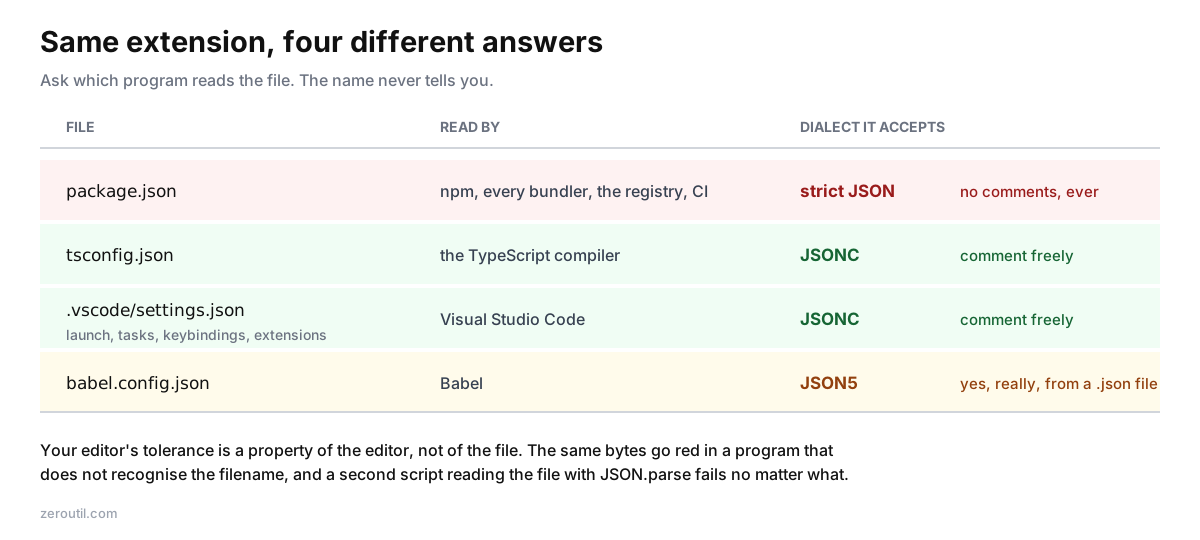
This confuses people for a completely reasonable reason: the file extension is identical, so it looks like the same format behaving inconsistently. It isn't. .json tells you nothing about which parser will read the file, and the three parsers in common use disagree about what counts as valid.
The extension is not the format
There is one specification for JSON, RFC 8259, and it is short.1 Double-quoted strings, double-quoted object keys, decimal numbers, true, false, null, objects and arrays. That is the entire grammar. No comments. No trailing commas.
What people call "JSON" in daily work is actually three dialects:
| Comments | Trailing commas | Unquoted keys | Single quotes | Hex numbers | |
|---|---|---|---|---|---|
| JSON (RFC 8259) | no | no | no | no | no |
| JSONC | yes | yes | no | no | no |
| JSON5 | yes | yes | yes | yes | yes |
Each one is a superset of the one above it. Every valid JSON document is valid JSONC; every valid JSONC document is valid JSON5.2 The reverse is never true, and that asymmetry is where the pain comes from.
Treat the table as what each dialect guarantees, not as what any particular parser happens to tolerate. Real readers drift, sometimes generously, and building on the drift is how a config stops working after a minor version bump.
If you have a file in front of you right now and you are not sure which one it is, paste it into the JSON Dialect Detector - it names the dialect, points at the exact line of each non-strict construct, and hands back a strict-JSON version.
Why tsconfig.json gets comments
tsconfig.json is read by the TypeScript compiler, and the TypeScript compiler ships its own JSONC reader. That was a deliberate product decision, and a defensible one: a TypeScript config is a list of roughly a hundred possible compiler flags, most of which are non-obvious, several of which interact. A config where every flag can carry a one-line justification is dramatically more maintainable than one where the reasoning lives in a wiki nobody updates.
{
  "compilerOptions": {
    // Bundler handles emit; tsc is typecheck-only here.
    "noEmit": true,
    // Required by the vitest setup - see tests/setup.ts
    "types": ["vitest/globals"],
  },
}
Visual Studio Code applies the same reader to its own config files. settings.json, launch.json, tasks.json, keybindings.json and .vscode/extensions.json are all treated as JSONC, which is why the editor shows no squiggle under that trailing comma after "types".
The catch is that the editor's tolerance is a property of the editor, not of the file. VS Code decides which reader to use from the filename and the language mode. Open a file it does not recognise as a known JSONC config, and the same bytes light up red.
The compiler's own reader drifts a little past JSONC, which is worth knowing precisely because you should not use it. Run the four JSON5 constructs through ts.parseConfigFileTextToJson on TypeScript 5.9 and unquoted keys and single-quoted strings are rejected, as you would expect, but { "x": 0xdecaf } parses happily to 912559. That is undocumented latitude, not a feature. Write tsconfig.json as JSONC and nothing else, or you are betting a build on behaviour nobody promised.
Why package.json does not
package.json is read by npm, by yarn, by pnpm, by every bundler, by the npm registry itself, by GitHub's dependency graph, by Dependabot, by countless CI scripts that do JSON.parse(fs.readFileSync('package.json')). It is a manifest consumed by an enormous and uncoordinated ecosystem.
A format is only as permissive as its least permissive consumer. The moment npm accepted comments, every one of those tools would need a JSONC reader too, or they would start failing on manifests that npm considered fine. So package.json stays strict, and it will stay strict.
The workaround people reach for is a dummy key:
{
  "//": "engines pinned to 20.x until the native addon is rebuilt",
  "engines": { "node": "20.x" }
}
This is ugly, but it is valid JSON and it survives, because npm ignores keys it does not recognise. Be clear about what that is, though: it is a community convention, not a feature. npm's own package.json reference documents no comment mechanism at all,5 so nothing promises the key will keep working.
One real constraint: you get the exact key "//" once per object, because duplicate keys are last-wins. Verified rather than assumed - JSON.parse('{"//":"first","//":"second"}') returns only second. For several notes at one level, use an array as the value.
The failure mode this actually produces
The confusion rarely shows up while editing. It shows up when a second program reads a file the editor has been happily accepting.
// scripts/check-config.mjs
import { readFileSync } from 'node:fs';
const cfg = JSON.parse(readFileSync('tsconfig.json', 'utf8'));
// SyntaxError: Expected property name or '}' in JSON at position 4 (line 2 column 3)
That message is worth reading closely, because it does not mention comments at all. It points at the slash and reports what it wanted instead, so the error you get is about a property name while the actual problem is the dialect. (Node's JSON errors were reworded in v20; older guides quote an "Unexpected token" phrasing you will no longer see.)
Nothing is wrong with tsconfig.json. It is a perfectly good JSONC file. The script simply used the wrong parser. The same thing happens when a Python script reads settings.json with json.load, when a shell pipeline runs jq over launch.json, or when a CI step lints a config with a tool that assumes strict JSON.
The fix is to match the parser to the dialect:
import { parse } from 'jsonc-parser';
const cfg = parse(readFileSync('tsconfig.json', 'utf8'));
jsonc-parser is the package VS Code itself uses. It handles comments and trailing commas and reports error offsets. strip-json-comments followed by JSON.parse also works, but it strips only comments unless you ask for more: trailing-comma handling is behind a trailingCommas option that defaults to false.4 Left at the default it solves half the problem, and the half it leaves behind is the one that shows up after somebody adds a flag to the end of a list.
What you should not do is write your own comment stripper. The regex everyone reaches for first is some variant of s.replace(/\/\/.*$/gm, ''), and it corrupts this:
{ "registry": "https://registry.npmjs.org/" }The // in the URL is inside a string literal. A regex does not know that; a parser does. Telling comments apart from string contents requires actually tracking quote state through the document, which is to say, requires parsing. This is the single most common way a config-reading script silently mangles data rather than failing loudly.
Where JSON5 fits
JSON5 is the most permissive of the three and the least widely deployed. It allows everything JSONC does, plus unquoted identifier keys, single-quoted strings, hexadecimal numbers, leading and trailing decimal points, explicit + signs, Infinity, NaN, and multi-line strings via backslash continuation.
{
  unquoted: 'and single-quoted',
  hex: 0xdecaf,
  trailing: .5,
  positive: +1,
}
Where you actually meet it is more interesting than a .json5 extension, and it makes this article's point better than any example I could invent: Babel parses babel.config.json and .babelrc.json as JSON5.3 The file is named .json, the editor will probably treat it as JSON, and the parser reading it accepts single quotes and unquoted keys. The extension told you nothing, again.
Beyond that you find it in projects that opted in deliberately with the json5 package. It is a nicer format to hand-write. It is also one more parser every consumer needs, which is why it has not displaced the other two.
One asymmetry worth knowing: converting JSON5 down to strict JSON is not always lossless, and it fails quietly. Round-trip { big: Infinity, nope: NaN, hex: 0xdecaf, half: .5, plus: +1 } through JSON5.parse and JSON.stringify and you get:
{"big":null,"nope":null,"hex":912559,"half":0.5,"plus":1}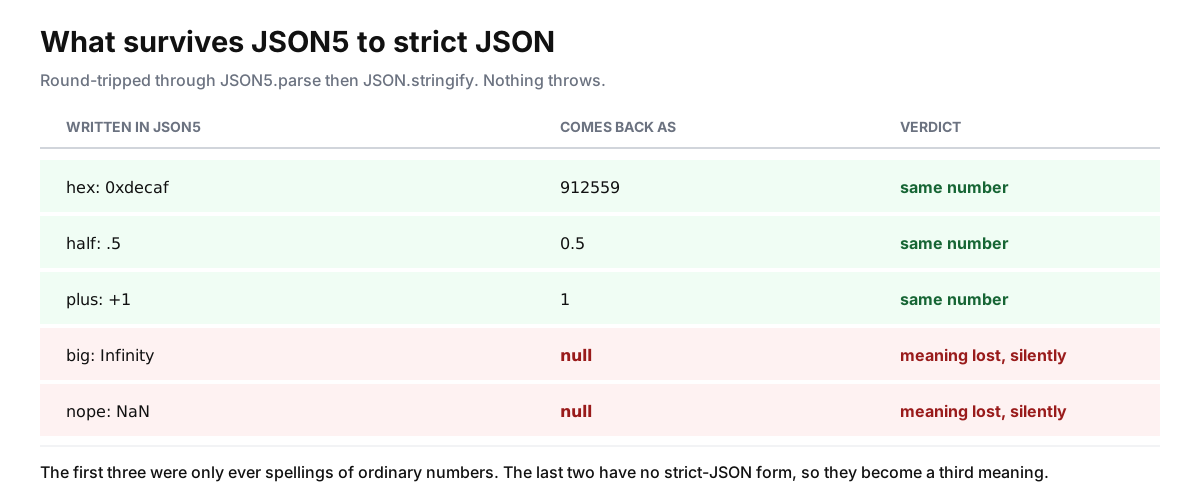
The last three survive, because hex, a leading decimal point and an explicit plus are spellings of ordinary numbers. The first two do not: Infinity and NaN have no strict-JSON representation, and JSON.stringify writes null rather than raising. Two values silently became a third meaning. If they carry meaning in your data, encode them as strings and convert on the way back in.
The rule worth remembering
Ask which program reads the file, not what the file is called.
- Read by the TypeScript compiler or VS Code, and only by them: JSONC is fine, comment freely.
- Read by npm, a registry, or anything you do not control: strict JSON, no exceptions.
- Read by your own code with a parser you chose: whatever you like, as long as every consumer agrees.
When you inherit a config and cannot tell which bucket it falls into, the dialect detector answers it in one paste. And when a parse error has you counting characters by hand, the JSON Formatter will point at the offending byte - the approach is covered in more depth in Debugging Malformed JSON, and the full comparison of the three formats lives in JSON vs. JSON5 vs. JSONC.
Sources
Every number in this article traces to a source below. Where a claim could not be sourced, it was cut rather than softened.
- Primary sourceIETF
The complete JSON grammar, that it has no comments and no trailing commas, and that object keys must be double-quoted strings.
- Primary sourceJSON5
The JSON5 additions over JSON, including unquoted identifier keys, single-quoted strings, hexadecimal numbers, leading and trailing decimal points, explicit plus signs, Infinity and NaN, and multi-line strings.
- Primary sourceBabel
The file extensions Babel accepts for its configuration, and that babel.config.json and .babelrc.json are parsed as JSON5 despite the .json extension.
- Primary sourceSindre Sorhus
That the package strips trailing commas as well as comments when the trailingCommas option is set, and that the option defaults to false.
- Primary sourcenpm
That npm's own reference for package.json documents no comment mechanism of any kind, which is why the double-slash key is a convention rather than a feature.
Topics
- JSON
- JSONC
- JSON5
- Vscode
- Configuration
Tools mentioned in this article
- JSON Dialect Detector - Tell whether a file is JSON, JSONC or JSON5 - and convert it to strict JSON.
Get new tools by email
New tools and the occasional deep-dive, about once a month. No spam, no sharing your address, unsubscribe in one click.