Cropping a Video to 9:16 or 1:1: How Much of the Frame You Keep
A 9:16 crop of a 1080p video keeps under a third of the frame. Exact crop sizes for 1:1, 4:5 and 4:3, and why FFmpeg trims odd sizes by a pixel.
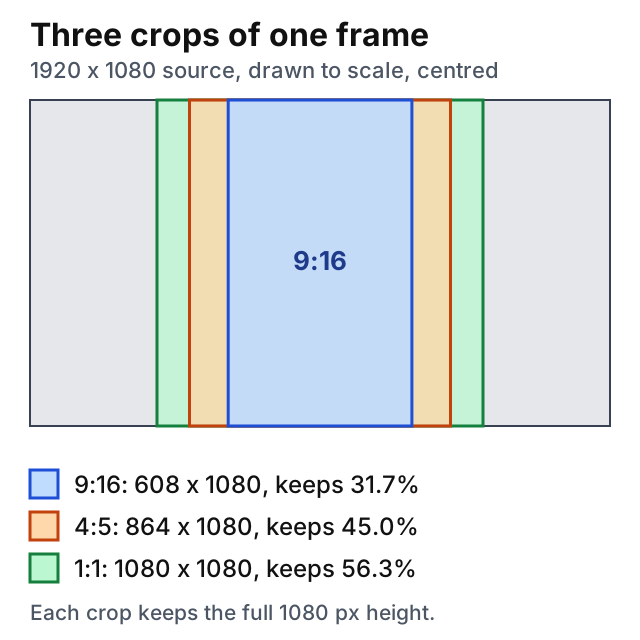
Crop a 1920 by 1080 video to 9:16 and the result is 608 pixels wide. Under a third of the frame is left, and the rest is gone for good. Switching a horizontal video to vertical looks like a small edit, and it throws away most of the picture.
The sizes are fixed by geometry, so you can work them out before you touch a file.
What the crop rectangle is
A crop to a ratio takes the largest rectangle of that ratio that fits inside the frame. When the source is wider than the target, as a 16:9 video is next to 9:16, the rectangle keeps the full height and its width is the height times the ratio. For 9:16 on a 1080-pixel-high source that is 1080 × 9 ÷ 16, which is 607.5.
The share of the frame that survives is the target ratio divided by the source ratio. For 9:16 out of 16:9 it is (9/16) ÷ (16/9) = 81/256, or 31.6%. It does not depend on resolution. A 4K source loses the same fraction as a 720p one.
Here are the largest centred rectangles for common sources. Sizes are rounded down to even numbers, for a reason covered below.
| Source and target | Crop rectangle | Pixels kept |
|---|---|---|
| 1920×1080 to 9:16 | 608×1080 | 31.7% |
| 1920×1080 to 4:5 | 864×1080 | 45.0% |
| 1920×1080 to 1:1 | 1080×1080 | 56.3% |
| 1920×1080 to 4:3 | 1440×1080 | 75.0% |
| 3840×2160 to 9:16 | 1214×2160 | 31.6% |
| 1280×720 to 9:16 | 404×720 | 31.6% |
| 1080×1920 to 16:9 | 1080×608 | 31.7% |
| 1080×1920 to 1:1 | 1080×1080 | 56.3% |
The last two rows are the reverse job, a vertical phone clip cropped to widescreen. The geometry is the same turned on its side: the width stays, and the height shrinks to 31.7%.
Resolution is what you give up
A 9:16 crop of a 1080p video is 608 pixels wide. If you then need a full 1080 by 1920 frame, the crop has to be scaled up by 1080 ÷ 608, about 1.78 times, and the picture gets soft. The same crop from a 4K source is 1214 by 2160, and scaling that to 1080 by 1920 is a reduction by about 0.89. So the sharper vertical clip comes from the higher-resolution source, and a crop alone never adds pixels. Scaling is a separate step that a crop does not do.
Where the rectangle sits
By default the rectangle is centred. FFmpeg's crop filter sets x to (in_w-out_w)/2 and y to (in_h-out_h)/2 when you leave them out1. For 608 by 1080 out of 1920 by 1080 that is x = 656, and in a test crop=608:1080 produced the same first frame as crop=608:1080:656:0.
The rectangle can slide anywhere the frame allows. A 608-pixel strip in a 1920-pixel frame has 1,312 pixels of travel, so x can be anything from 0 to 1312. Most reframing is a choice of x. If the speaker stands left of centre, a centred crop cuts them in half.
FFmpeg approximates an invalid x or y to the nearest valid value1. The Video Cropper goes the other way and refuses a rectangle that leaves the frame, with an error message instead.
Why odd sizes shrink by a pixel
Type your own numbers and you can ask for a size that does not exist. H.264 video usually uses the yuv420p layout, which stores one pair of colour samples for every 2 by 2 block of brightness samples2. A frame of odd width has a block that is cut in half, so encoders want even sizes.
What happens next depends on which filter you ask. In November 2026, on an Apple M3 Pro with FFmpeg 9.0.2, a synthetic 1920 by 1080 clip was cropped and encoded with libx264 at the fast preset:
crop=607:1080gave a 606×1080 file, with no error.crop=607:1079gave a 606×1078 file, with no error.crop=607:1080:exact=1stopped withwidth not divisible by 2 (607x1080).scale=607:1080stopped with the same error.
The crop filter rounds an odd size down by itself. Its documentation describes an exact option, off by default. When it is on, subsampled video is cropped at exactly the width, height, x and y you give, and "will not be rounded to nearest smaller value"1. Switch it on with an odd size and the encoder refuses the frame, and nothing is written. The offsets are rounded the same way. In a test, x=657 gave a frame identical to x=656, and x=657 with exact=1 gave a different one.
An odd size therefore does not fail. It silently costs a pixel you did not ask to lose, and the offset can move by a pixel as well. That is harmless for a reframe. When you need an exact number, ask for even sizes and the result is what you typed.
There is one more rounding case. For 9:16 on a 1080-pixel-high frame, the exact width is 607.5, and no even number matches it. The preset in the Video Cropper picks 608. The expression crop=trunc(ih*9/16/2)*2:ih truncates and gives 606. Neither is wrong, since the ratio is off by a fraction of a percent either way.
What a crop does to the file
A crop changes pixels, so the video must be decoded, cropped and encoded again. A copy of the stream cannot do it. The Video Cropper encodes with libx264 at the fast preset and default quality, and copies the audio unchanged. In a test, AAC audio came out as AAC, and the Opus audio of a WebM source came out as Opus in the MP4. One encode costs a little quality, as any lossy re-encode does, which is another reason to crop once and from the best source you have.
The command line equivalent of a centred 9:16 crop from a 1080p file is:
ffmpeg -i input.mp4 -vf "crop=608:1080" \
  -c:v libx264 -preset fast \
  -c:a copy output.mp4
Add x and y to move the rectangle, for example crop=608:1080:1000:0.
Which ratio to pick
A ratio that keeps more of the frame loses less. From a 16:9 source, 4:3 keeps 75%, 1:1 keeps 56%, 4:5 keeps 45% and 9:16 keeps 32%. If the subject is wide, such as two people side by side or a screen recording, a tall crop forces a choice, and a square or 4:5 keeps both in view. If the clip needs trimming as well, cut it first with the Video Trimmer so the crop encodes only the part you need, and use the Video Compressor afterwards if the file is still too large.
The Video Cropper has presets for 16:9, 9:16, 1:1 and 4:3 that fill in the largest centred rectangle from the table above. For 4:5 or any other ratio, type the rectangle yourself.
Sources
Every number in this article traces to a source below. Where a claim could not be sourced, it was cut rather than softened.
- Primary sourceFFmpeg
That the crop filter's x and y default to (in_w-out_w)/2 and (in_h-out_h)/2, that its exact option, off by default, makes subsampled video be cropped at exactly the width, height, x and y given instead of being rounded to the nearest smaller value, and that an invalid x or y is approximated to the nearest valid value.
- Primary sourceFFmpeg
That AV_PIX_FMT_YUV420P, the common decoded layout for H.264 video, is planar YUV 4:2:0, with one Cr and one Cb sample per 2x2 block of Y samples.
Topics
- Ffmpeg
- Crop Video
- Aspect Ratio
- Video Processing
Tools mentioned in this article
- Video Cropper - Crop MP4, WebM, MOV and MKV videos to a rectangle or aspect preset (16:9, 9:16, 1:1, 4:3). Server-side FFmpeg, no signup. Files auto-deleted after 15 minutes.
- Video Trimmer - Cut a section from MP4, WebM or MOV videos. Stream-copy is fast and lossless.