CS2 Voice Comms Calculator
Hear specific players in a CS2 or FACEIT demo - upload it to auto-fill players and get the tv_listen_voice_indices commands.
Reviewed by Selim Ataballyev
Free browser extension
 Free browser extension
Hear who said what, in one click
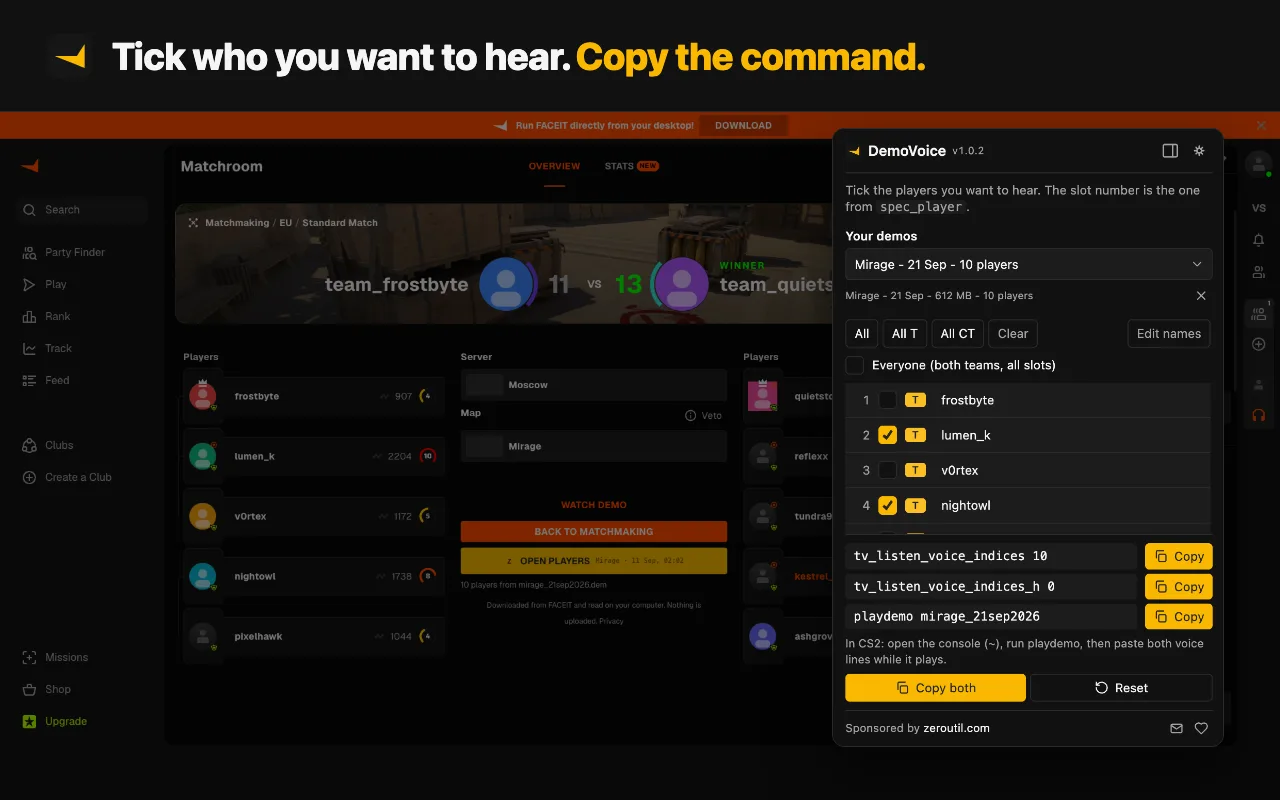
Demo from FACEIT? DemoVoice does this from the match room: no downloading the .dem.zst, no unzipping, no uploading it here, and no digging for the file on disk.
Runs 100% in your browser - your data never leaves your device
Paste both commands into the CS2 console, then play the demo - you only hear the ticked players. The reset command puts both convars back to the CS2 default of 0, which is nobody; tick "listen to everyone" above for the -1 that unmutes the lot.
What You Should Know
To hear specific players in a CS2 demo, set tv_listen_voice_indices <number> and tv_listen_voice_indices_h 0 in the console before you play the demo. The number is a bitmask of the spectator slots you want to hear. Upload the demo to this tool to fill the players automatically and copy the exact commands - or tick slots manually. Voice is only recorded in FACEIT and server demos; matchmaking and Premier demos contain no voice data.
How to Use the Voice Comms Calculator
- Get a demo that contains voice. FACEIT and other server (SourceTV) demos record voice; Valve matchmaking and Premier demos do not. FACEIT demos download as .dem.zst - you can use them directly. Reviewing a FACEIT demo covers which of the two files to open.
- Upload the demo (drag and drop works). It is read in your browser and never leaves your computer, and each spectator slot fills with the right player name and team. Or tick the slots manually instead.
- Select who to hear - individual players, or All / All T / All CT for a whole side.
- Copy both commands and paste them into the CS2 console before playing the demo.
Prefer one click on FACEIT? The DemoVoice browser extension gets the demo straight from the match room, reads the players on your computer without uploading anything, and hands you the same commands.
What the Numbers Mean
The tool builds the 32-bit bitmask that tv_listen_voice_indices expects: bit 0 is spectator slot 1, bit 1 is slot 2, and so on. Ticking slots 1, 3 and 4 produces 1 + 4 + 8 = 13. The companion tv_listen_voice_indices_h covers slots 33-64 used by larger SourceTV lobbies, with slot 33 as its bit 0; a normal 5v5 never uses those slots, so it stays at 0 unless a player sits in slot 33 or higher. Both values are signed 32-bit numbers, so a set top bit (slot 32 or slot 64) shows up as a negative number. Setting both to 0 resets the filter, and -1 means hear everyone. For the full walkthrough of hearing voice comms in a CS2 demo, including how to add the slot values by hand, see the guide.
Typical Uses
- Reviewing your own comms after a FACEIT match to hear what information was actually called and when.
- Isolating one player - tick a single slot to verify a toxic teammate report or to study how a specific in-game leader calls mid-round.
- Listening to one team at a time when casting or making highlight clips, so crosstalk from twenty voices does not drown the round story.
Frequently Asked Questions
How do I hear voice comms in a CS2 demo?
Set tv_listen_voice_indices and tv_listen_voice_indices_h in the console before playing the demo (_h stays at 0 unless a player sits in slot 33 or higher, which normal 5v5 demos never have; for everyone both are -1). The number is a bitmask of the spectator slots you want to hear. The easiest way is to upload the demo here - it fills the players automatically and gives you the exact commands to copy.
Why can't I hear voice in my matchmaking or Premier demo?
Because Valve matchmaking and Premier demos do not record player voice at all - there is simply no voice data in the file, so no command can play it back. Voice is recorded in FACEIT, ESEA and other server (SourceTV) demos. If you want to review comms, use a FACEIT demo.
How do I hear only one team, or only the enemy, in a demo?
Upload the demo so each player shows their team, then click "All T" or "All CT" to select just that side (or tick individual players). Copy the commands and you will only hear that team. To isolate one toxic player, tick only their slot.
What is tv_listen_voice_indices?
It is the CS2 console variable that controls which players' voice you hear while watching a demo. Its value is a 32-bit bitmask: bit 0 is spectator slot 1, bit 1 is slot 2, and so on up to slot 32. Set it to -1 to hear everyone, or use this calculator to build the exact number for the players you want.
What does tv_listen_voice_indices -1 do?
-1 sets every bit of the mask, so you hear every player's voice in the demo. Type tv_listen_voice_indices -1 and tv_listen_voice_indices_h -1 in the console to cover all 64 slots; a normal 5v5 demo only needs the first. To hear one player or one team instead, tick their slots in this calculator and paste the two numbers it gives you.
What is the difference between tv_listen_voice_indices and tv_listen_voice_indices_h?
tv_listen_voice_indices covers spectator slots 1-32 and tv_listen_voice_indices_h covers the high slots 33-64 (used in larger lobbies / SourceTV). Together they form one 64-bit mask. A normal 5v5 demo keeps its players in slots 1-10, so _h stays at 0 unless a player sits in slot 33 or higher. This tool fills in both, and sets both to -1 when you pick everyone.
Why does the player slot change every time I reload the demo?
Spectator slots are assigned from the player entity order in the demo, which can shift between playback sessions. Uploading the demo here reads the actual slot for each player, so you do not have to re-check with spec_player after every reload.
Does this work for FACEIT demos?
Yes - FACEIT demos record voice, so the commands work. FACEIT CS2 demos are .dem.zst files; you can upload one directly here and it is decompressed and parsed for you. Matchmaking and Premier demos contain no voice.
Can I paste a FACEIT match link instead of the file?
Not yet - pasting a match link does not pull the demo on its own. Open the match room on FACEIT, download the .dem.zst, and drop it here. Automatic one-paste fetch is in progress; the tool offers a one-email waitlist for it when you try a match link.
Can it fill in the players automatically?
Yes. Upload your CS2 .dem (or a FACEIT .dem.zst) and the tool reads the demo and fills each slot with the correct player name and team, so you skip the tedious spec_player 1..16 loop entirely. Then tick the players you want and copy the commands.
Why is the command tv_listen_voice_indices and not tv_listen_voices_indices?
The real console command is tv_listen_voice_indices - singular "voice". Some guides write "voices" by mistake, but that command does not exist in CS2 and does nothing.
What happens to my demo when I upload it?
Nothing leaves your computer. The demo is read in your browser, so it is never sent to a server, stored or shared.
Learn more
Related tools
- CS2 Demo Voice Extractor
Download each player's voice from a CS2 or FACEIT demo as a separate audio file, and see who talked when, round by round.
- CS2 Demo Tick Calculator
Convert a CS2 demo tick to a timestamp and back, and copy the demo_gototick command that jumps there.
- CS2 Match Share Code Decoder
Decode a CSGO-xxxxx match share code into its match ID, outcome ID and token, and copy the command that downloads the demo.
- SteamID Converter
Convert between SteamID64, STEAM_0:Y:Z, SteamID3 [U:1:W], account ID and profile URL.
- CS2 Sensitivity Converter
Convert mouse sensitivity between CS2, Valorant, Apex and more, with eDPI and cm/360.
- CS2 Crosshair Code Decoder
Decode a CSGO-xxxxx crosshair share code into cl_crosshair console commands.
- Video Trimmer
Cut a section from MP4, WebM or MOV videos. Stream-copy is fast and lossless.
More Gaming Tools
CS2 Crosshair Code Decoder
Decode a CSGO-xxxxx crosshair share code into cl_crosshair console commands.
Open toolCS2 Demo Tick Calculator
Convert a CS2 demo tick to a timestamp and back, and copy the demo_gototick command that jumps there.
Open toolCS2 Demo Voice Extractor
Download each player's voice from a CS2 or FACEIT demo as a separate audio file, and see who talked when, round by round.
Open toolCS2 Match Share Code Decoder
Decode a CSGO-xxxxx match share code into its match ID, outcome ID and token, and copy the command that downloads the demo.
Open toolCS2 Sensitivity Converter
Convert mouse sensitivity between CS2, Valorant, Apex and more, with eDPI and cm/360.
Open toolSteamID Converter
Convert between SteamID64, STEAM_0:Y:Z, SteamID3 [U:1:W], account ID and profile URL.
Open tool