Every Way to Hear FACEIT Demo Voice Comms, Compared
Console commands, a web calculator, CS Demo Manager, a voice extractor and extensions: what each does for FACEIT demo voice and what it leaves to you.

Every route to hearing a FACEIT demo's voice ends at the same two console commands. What separates them is how much of the work before those commands you still do yourself, and whether the demo file leaves your computer along the way.
One disclosure first: zeroutil makes two of the options below, the CS2 Voice Comms Calculator and the DemoVoice extension. Both get the same treatment as everything else here, including what they do not do.
The five jobs every route has to cover
Hearing a single player in a demo is not one task. It is five, and any tool you pick is really a decision about which of them it takes off your hands.
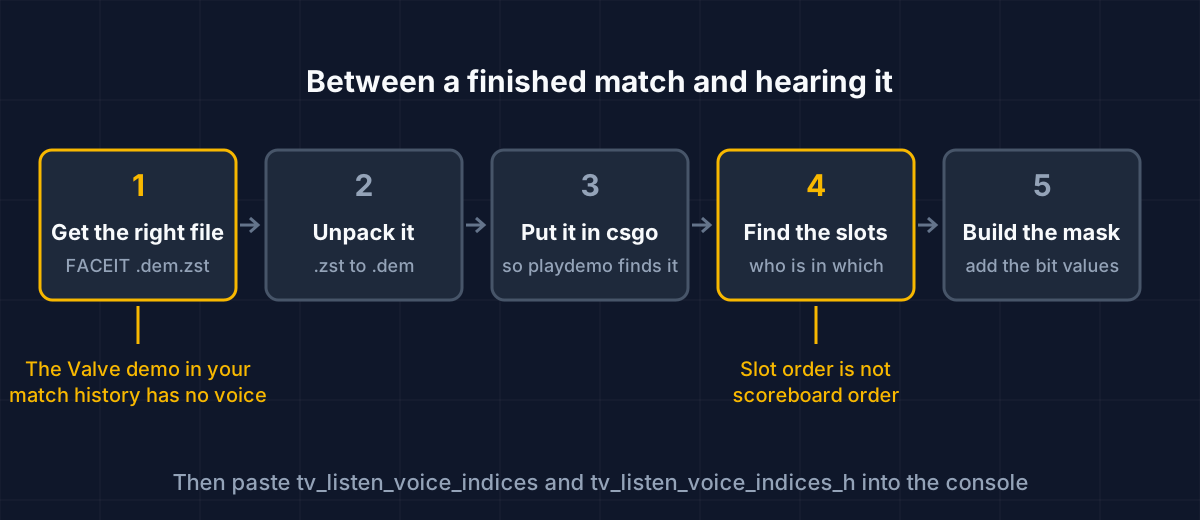
The two amber boxes are the ones that fail silently. Pick the Valve demo from your match history and there is no voice in the file, so no command can produce any. Guess the slots from the scoreboard and you get a mask that unmutes the wrong people. The other three steps are tedious but hard to get wrong.
Side by side
| Route | Where it runs | Gets the demo from FACEIT | Names each slot | Exports audio |
|---|---|---|---|---|
| Console commands by hand | Inside CS2 | No | No | No |
| zeroutil calculator | Web page, parsing in your browser | No | Yes, from an uploaded demo | No |
| CS Demo Manager | Desktop app plus PostgreSQL | Not in-app at present | Per player, by SteamID alias | Yes |
| csgo-voice-extractor | Command line | No | Not its job | Yes, WAV |
| Other calculator extensions | Browser popup or Windows app | Not stated | Not stated | One of them, see below |
| DemoVoice | Browser extension, on your computer | Yes, from the match room | Yes | No |
"Not stated" means exactly that. Where a tool's own listing does not say whether it reads the demo, this table does not guess.
Typing the commands yourself
FACEIT's support account gives players three lines to paste when reviewing a demo:1
tv_listen_voice_indices -1
tv_listen_voice_indices_h -1
tv_relaytextchat 2
-1 sets every bit, so everyone is audible, and the third line brings text chat back. If all you want is to hear the round, stop here. No install, nothing to trust, and it works on any demo that recorded voice in the first place.
It stops being enough the moment you want some players. The first command is a bitfield over slots 0 to 31, and _h covers slots 32 to 63.2 To hear two people you need their slot numbers and the sum of their bits, and nothing in the game tells you who sits where without cycling spec_player through them one at a time. The full guide to FACEIT demo voice walks through that arithmetic if you want to do it by hand.
The zeroutil calculator
The calculator takes over steps 4 and 5. Drop in a .dem, .dem.gz or .dem.zst and the slot table fills with names and teams; tick players and it writes both commands. There is also a manual grid that works offline, if you already know the slots.
The demo is read in your browser, so the file never leaves your machine. The limit is the first half of the job: pasting a FACEIT match link does not fetch the demo automatically right now, so steps 1 to 3 are still yours: find the match, download the .dem.zst from the match page, then drop it in.
CS Demo Manager
This is the heavyweight. CS Demo Manager is a free desktop application under the MIT licence7 that installs on Windows, macOS and Linux, and it needs a PostgreSQL database, version 17 or newer, before it will open past its connection screen.3 That setup cost is the whole trade: once it is running you get statistics, heatmaps, round browsing and voice handling in one place.
For voice specifically it gives you console aliases, voice_all, voice_ct, voice_t and voice_STEAMID64, to use while an analysed demo plays.5 The team aliases carry a trap its own docs point out: they follow each player's starting side. After halftime, voice_t means the team that is now playing CT. Since version 3.3.0 it can also export players' voices from CS2 demos to audio files,6 which nothing browser-based on this list does.
What it cannot currently do is fetch your FACEIT match. Its documentation says FACEIT restricted demo downloads to a private API, that in-app downloads are unavailable with no ETA, and that you should open the match in your browser and click Watch Demo instead.4 So step 1 is manual here too.
If you review demos several times a week and want the analysis as well as the voice, the database setup pays for itself. For one match you want to hear tonight, it is a lot of machinery.
csgo-voice-extractor
A different job entirely. This command-line tool, from the same author as CS Demo Manager, does not unmute anything in the game. It writes each player's voice out of the demo into WAV files, either one file per player with the silence cut, one per player at full demo length, or everything merged into one track.8 It runs on Windows, macOS and Linux.
Reach for it when the audio has to live outside CS2: a clip for a video, a callout you want to send a teammate, evidence for a report. Its README also carries the warning that applies to every tool here: Valve matchmaking demos contain no voice audio data, so there is nothing to extract from them.8
Other calculator extensions and apps
Two others come up in searches, and both are described here only by what their own pages say.
Demo Voice Command Calculator CS2 is a Chrome extension whose listing describes "a popup that is able to calculate the commands to listen to voice comms in CS2 Demo". At the time of writing the listing shows version 1.1, last updated on 27 August 2024.9 The listing does not say whether it reads player names from a demo or whether you enter slots yourself.
CS2 SourceTV Demo Voice Calculator is a Windows desktop program that needs the .NET 8 runtime. Its README lists voice extraction and playback among its features, and its author now directs users to a redesigned successor, Small Demo Manager.10
DemoVoice
DemoVoice is the one built around step 1. It adds a button to a finished FACEIT match room; pressing it downloads that match's demo from FACEIT, unpacks the .zst as it downloads, and reads every player's name, team and slot out of the file inside your browser. Tick the players, copy the commands. A best-of-three gets one button per map.
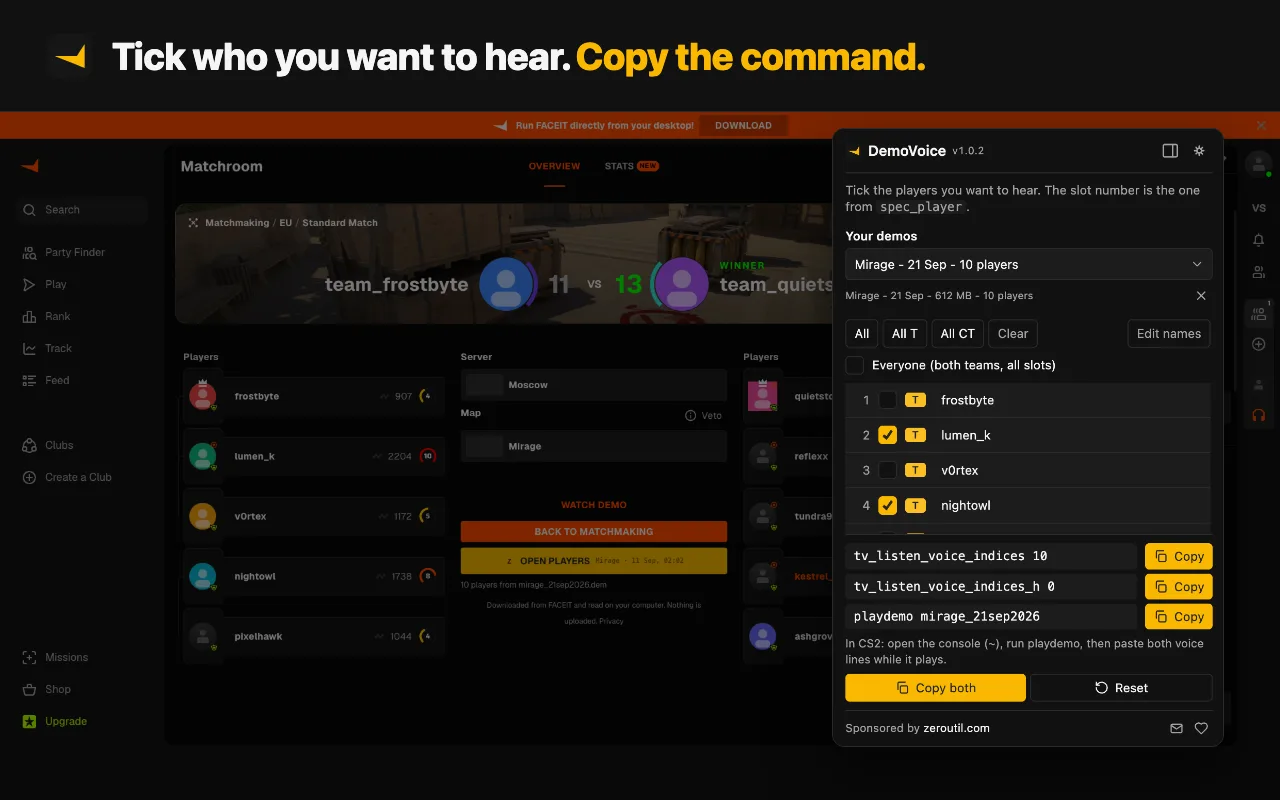
Because it starts from the match room, it cannot pick the silent Valve demo by mistake, and because the slots come from the file you are about to play, the mask matches that file. On Chrome and Edge you can point it at your csgo folder once, so the demo lands where playdemo looks and step 3 disappears too.
The limits are the flip side of the design. It only works from FACEIT match rooms, so a demo from another league or a file already on disk goes through the calculator instead. It does not export audio; for that, use the extractor or CS Demo Manager. It is free, has no account, and sends the demo nowhere. You can read more about it or install it from the Chrome Web Store, Edge Add-ons or Firefox Add-ons.
Which one to use
- You want everyone, once: type the three FACEIT commands. Nothing else is faster.
- You want specific players from a FACEIT match: DemoVoice, since it covers the two steps that go wrong.
- The demo is from another league, or already on your disk: the calculator, upload or manual grid.
- You need the audio as a file: csgo-voice-extractor, or CS Demo Manager if you already run it.
- You analyse demos seriously and often: CS Demo Manager, and accept the database setup.
Free browser extension
 Free browser extension
The only route on this page that starts in the FACEIT match room: it fetches the right demo, unpacks it and names every slot on your computer, then writes both commands.
If the voice is still silent after all of this, the cause is almost never the tool. Why a CS2 demo has no voice goes through the checks in order, starting with whether the server recorded anything at all.
Sources
Every number in this article traces to a source below. Where a claim could not be sourced, it was cut rather than softened.
- Primary sourceFACEIT
The three console commands FACEIT tells players to paste to hear voice comms and see chat when reviewing a demo.
- Peer-reviewedb0ink
That tv_listen_voice_indices is a bitfield of player slots 0 to 31 and tv_listen_voice_indices_h covers slots 32 to 63.
- Primary sourceCS Demo Manager
That CS Demo Manager installs on Windows, macOS and Linux and requires a PostgreSQL database, version 17 or later.
- Primary sourceCS Demo Manager
That in-app FACEIT demo downloads are unavailable because FACEIT moved downloads to a private API, with no ETA, and that users should download from the match page instead.
- Primary sourceCS Demo Manager
The voice_all, voice_ct, voice_t and voice_STEAMID64 console aliases, and that the team aliases follow each player's starting side.
- Primary sourceCS Demo Manager
That version 3.3.0 added exporting players' voices from CS2 demos.
- Primary sourceAkiVer
That CS Demo Manager is free and published under the MIT licence.
- Primary sourceAkiVer
That the extractor is a command-line tool for Windows, macOS and Linux that writes players' voices to WAV files in three modes, and that Valve matchmaking demos contain no voice audio data.
- Primary sourceChrome Web Store
The extension's own description of a popup that calculates the voice commands, at version 1.1, last updated 27 August 2024.
- Primary sourcepythaeusone
That this voice calculator is a Windows desktop program needing the .NET 8 runtime, that it lists voice extraction and playback, and that its author now points users to a redesigned successor, Small Demo Manager.
Topics
Tools mentioned in this article
- CS2 Voice Comms Calculator - Hear specific players in a CS2 or FACEIT demo - upload it to auto-fill players and get the tv_listen_voice_indices commands.
- CS2 Demo Tick Calculator - Convert a CS2 demo tick to a timestamp and back, and copy the demo_gototick command that jumps there.
- SteamID Converter - Convert between SteamID64, STEAM_0:Y:Z, SteamID3 [U:1:W], account ID and profile URL.
Get new tools by email
New tools and the occasional deep-dive, about once a month. No spam, no sharing your address, unsubscribe in one click.