Why You Can't Hear Voice in Your CS2 Demo (Fixes)
Can't hear voice comms in a CS2 or FACEIT demo? The real causes - no voice in MM/Premier demos, unset tv_listen_voice_indices, reset commands - and fixes.
Total silence where the comms should be, or it worked yesterday and now it doesn't. Here are the actual reasons, roughly in the order they catch people out. The first two are not fixable from the console at all, which is worth knowing before you spend an evening on your config.
Most likely cause: the demo is a Valve matchmaking or Premier demo, which records no voice at all. Download the FACEIT demo of the match instead, then set the commands with the CS2 Voice Comms Calculator.
1. Matchmaking and Premier demos have no voice in them
This is the number one cause and no command touches it. Valve matchmaking and Premier demos contain no voice audio data. The tool that extracts voice tracks out of Counter-Strike demos carries the warning at the top of its README: there is nothing in an MM demo to extract.1
Voice comes from FACEIT, ESEA and other SourceTV servers. If you want to hear comms from a match you played, download the FACEIT demo - a .dem.zst file - not the Valve one.
2. The server never captured voice in the first place
The cause almost nobody mentions, and the reason a demo from your own server can be just as silent as an MM one. In CS2, SourceTV does not record player voice unless the server enables it, historically by running sv_alltalk 1 or a plugin that sets the SourceTV voice flags for you.2
FACEIT and the leagues record comms. A community server someone rented for pickups very possibly does not, and there is nothing you can do about it after the fact.
This is also the setting that decides whether the other side is in your file at all, which is its own question: hearing the enemy team in a demo works through what SourceTV was allowed to hear, and how to tell "no voice" apart from "one side only".
3. The command is still at its default
Even in a demo that does have voice, you hear nobody until you say otherwise. Both convars default to 0, and 0 means nobody.2 FACEIT's own support account hands out these three lines:3
tv_listen_voice_indices -1
tv_listen_voice_indices_h -1
tv_relaytextchat 2
-1 fills every bit of both halves of the bitfield, so it unmutes everyone. To hear only specific players you want a slot bitmask in the first command and 0 in the _h one - the voice comms calculator builds it for you, and hearing voice comms in a CS2 demo covers deriving that mask by hand.
4. You're watching the wrong file
A FACEIT match leaves you two demos: the Valve one from your in-game match history, and FACEIT's own. If you grabbed it in game, you have the silent copy. You want the one from the FACEIT match room, a .dem.zst.
Quick way to tell them apart without watching either: drop the file into the calculator. It reads the slot table and shows you the player names and the score, so you can confirm you have the right match in the right file before you start hunting for a round.
5. The number points at the wrong player
If you reused a bitmask and are hearing the wrong person, the mask is from another demo. Slots come from the player entity order recorded in that file, which is not the scoreboard order and has no reason to match between matches. Within one demo they are fixed and replay identically; across demos they are meaningless.
Re-read them with spec_player 1, spec_player 2 and so on, or let the calculator read the whole table at once.
6. You can hear voice but can't tell who's talking
Expected, and the fix is text chat:
tv_relaytextchat 22 relays everything including all-chat, 0 hides it entirely. It is the third line in FACEIT's own recipe for a reason3 - matching a call to a name is much easier with the chat log running alongside.
7. You typed tv_listen_voices_indices
The command is tv_listen_voice_indices - singular voice. The plural version does not exist, and an unknown convar fails quietly, which looks identical to broken voice playback. Copy it rather than typing it.
8. They reset when you close the game
Neither convar persists. They are back to 0 on the next launch, so nothing broke overnight - the session simply started from the default of silence. Keep the commands somewhere you can paste from.
The quick checklist
- FACEIT or league demo, not matchmaking or Premier.
- The server recorded voice at all.
tv_listen_voice_indicesset to-1or a slot mask,_hto-1or0to match.- Spelled
voice, notvoices. - Re-entered this session.
- Watching the FACEIT
.dem.zst, not the Valve copy.
Get the exact commands without deriving them: upload your demo to the CS2 Voice Comms Calculator, tick who you want to hear, and copy.
Two of the six entries above are really the same mistake - opening the Valve copy of a FACEIT match instead of FACEIT's own. Which of a FACEIT match's two demos carries the voice settles that one for good.
Free browser extension
 Free browser extension
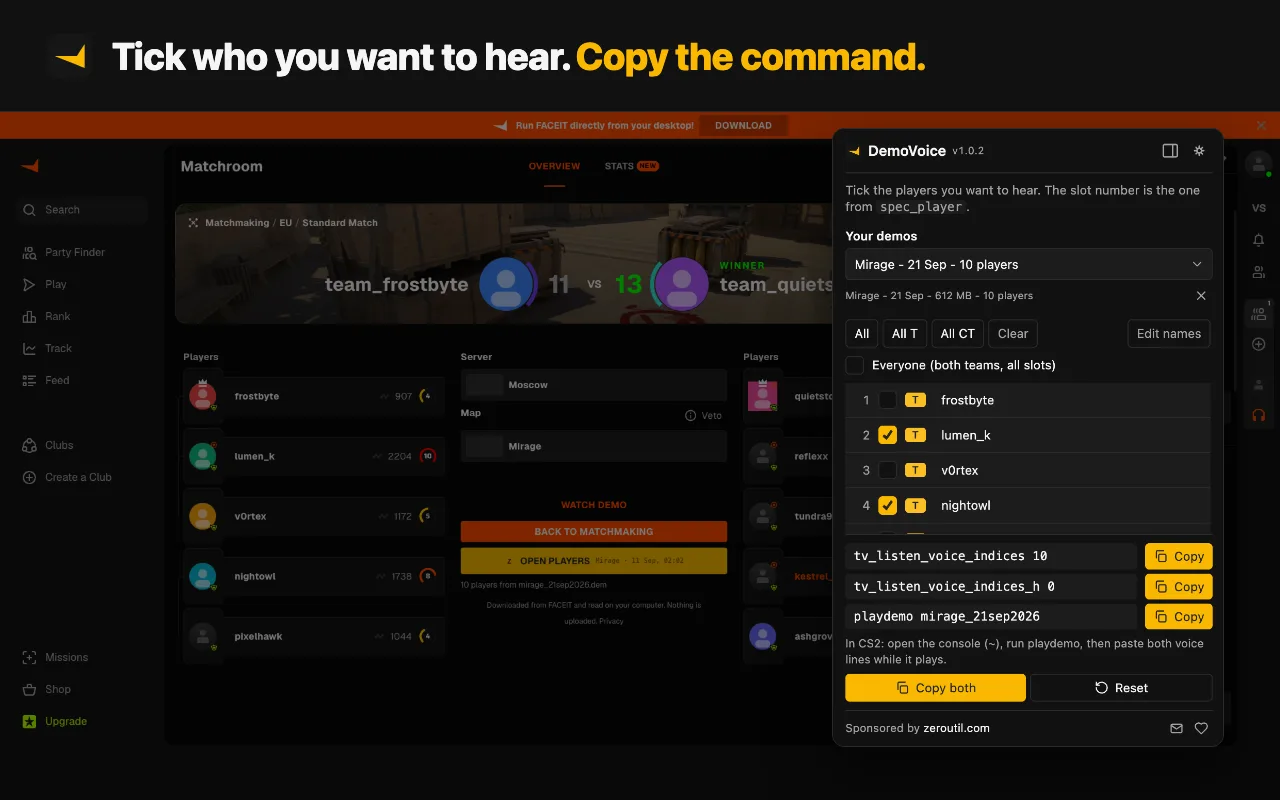
Four of the causes on this list are ones DemoVoice cannot produce: it takes the demo from the FACEIT match room rather than your match history, reads the slots out of the file, puts names against them, and writes both commands spelled correctly.
Sources
Every number in this article traces to a source below. Where a claim could not be sourced, it was cut rather than softened.
- Peer-reviewedAkiVer
That Valve matchmaking demos contain no voice audio data, stated as a standing warning by the author of the tool that extracts voice tracks from CS:GO and CS2 demos.
- Peer-reviewedb0ink
That CS2 SourceTV does not record player voice unless the server enables it, and the verbatim convar descriptions giving tv_listen_voice_indices as player slots 0 to 31, tv_listen_voice_indices_h as the high 32 bits, and a default of none for both.
- Primary sourceFACEIT
The three commands FACEIT tells players to paste when reviewing a FACEIT demo, including tv_relaytextchat 2 for chat logs.
Topics
Tools mentioned in this article
- CS2 Voice Comms Calculator - Hear specific players in a CS2 or FACEIT demo - upload it to auto-fill players and get the tv_listen_voice_indices commands.
- CS2 Crosshair Code Decoder - Decode a CSGO-xxxxx crosshair share code into cl_crosshair console commands.
- SteamID Converter - Convert between SteamID64, STEAM_0:Y:Z, SteamID3 [U:1:W], account ID and profile URL.
Get new tools by email
New tools and the occasional deep-dive, about once a month. No spam, no sharing your address, unsubscribe in one click.