How to Hear the Enemy Team's Voice in a CS2 Demo
Whether you can hear the enemy in a CS2 demo depends on what the server recorded, not on your console. Which demos carry it, and the mask for one side.
During a match you cannot hear the enemy. That is not a mute on your end - it is the server declining to send you their voice at all. A demo does not undo that decision, it replays it.
So the question splits in two, and only the second half is about console commands: was the enemy's voice ever written into this file, and if it was, how do you pick them out of the ten?
Isolating one player is the simpler version of the same job - hearing voice comms in a CS2 demo covers that end of it, and the rest of this page is the harder case.
Just want the number? Upload the demo to the CS2 Voice Comms Calculator, which reads the slot table and labels each player with their team, so "the other five" is something you click rather than something you guess.
The short answer
Set both convars to -1 before playback and you will hear everyone the file contains, enemy included:
tv_listen_voice_indices -1
tv_listen_voice_indices_h -1
If the enemy is still silent after that, you are not missing a command. Their voice is not in the demo, and the rest of this page is about why, and which file to go get instead.
Why the enemy is missing to begin with
Voice in Counter-Strike is routed by team. sv_alltalk is the switch, and what turning it on does is described by the game itself as letting players hear all other players' voice communication with no team restrictions.3 Competitive play runs with it off, which is the point - you should not hear the site call from the people taking the site.
Follow that through to the recording. A POV demo, the kind you make yourself with record, is a recording of the network stream your client received. With alltalk off, the enemy's voice packets were never in that stream. There is nothing to unmute later, because nothing arrived.
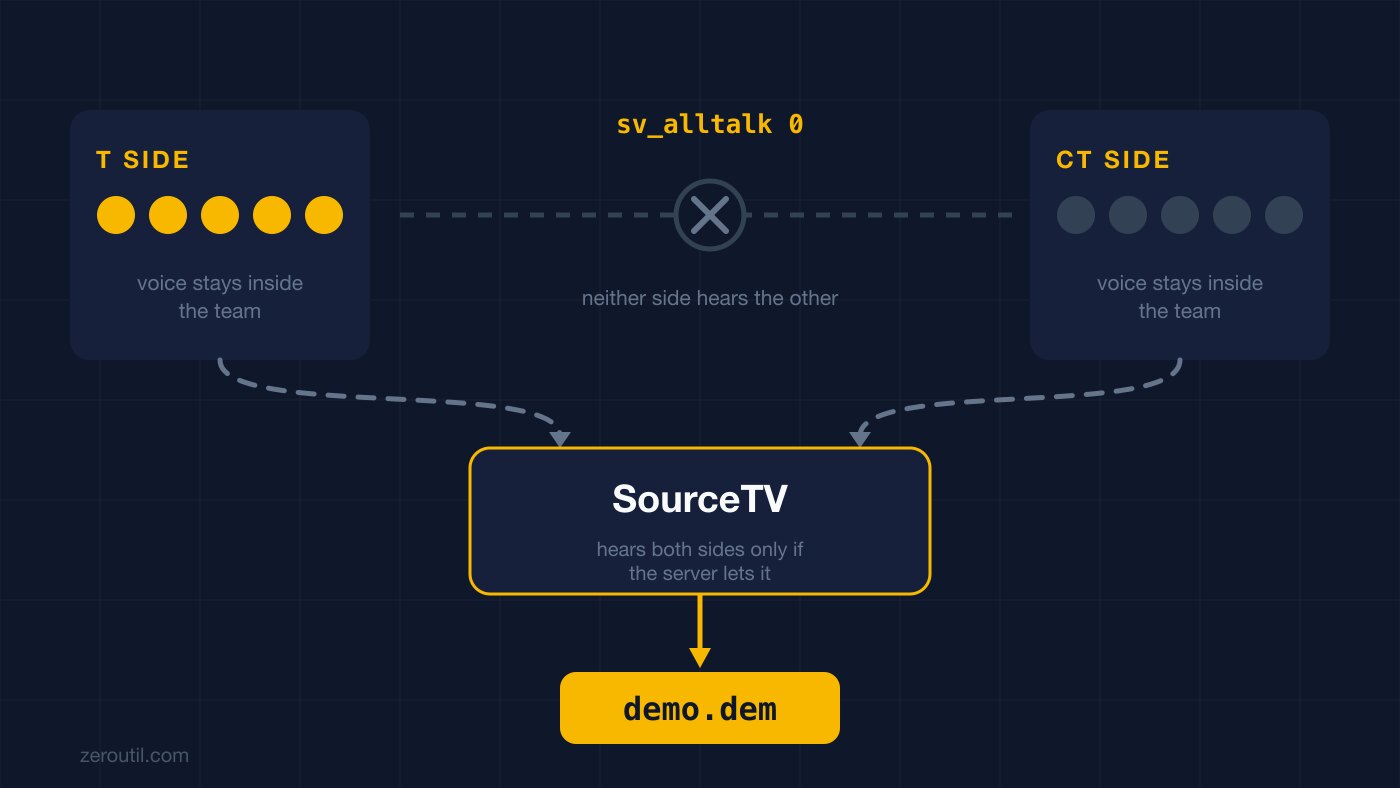
SourceTV is a listener too, and that is the whole mechanism
The demos you download are not your client's recording, they are SourceTV's. Which raises the same question one level up: what was SourceTV allowed to hear?
In CS2 the answer is, by default, nothing. SourceTV does not record player voice chat unless the server has sv_alltalk 1, and the community plugin that exists to fix this works by modifying SourceTV's own voice flags so that it hears the voices of all players.2 Not by adding a recording feature - by moving SourceTV out of the team-routing rules that were keeping half the match away from it.
That is the entire explanation for why FACEIT demos have both teams in them and your matchmaking demo does not.
Which demos actually contain the enemy
| Demo source | Enemy voice in the file? |
|---|---|
Your own POV recording (record) | No - your client was never sent it |
| Valve matchmaking | No - the file carries no voice at all |
| Valve Premier | No - same |
| FACEIT | Yes |
| ESEA and other leagues | Yes, where the league records comms |
| Community SourceTV server | Only if that server enabled it |
The two Valve rows deserve their own note, because they fail for a different reason than the first row does. Matchmaking and Premier demos contain no voice audio data whatsoever - the tool that extracts voice tracks out of Counter-Strike demos carries that warning at the top of its README, because there is nothing in an MM demo to extract.1 Your own team is missing too. The track is empty, so team routing never enters into it.
So if you want to review what the other side called, the file you need is the FACEIT one for that match, not the Valve one.
Hearing only the enemy
-1 gives you all ten talking over each other, which is fine for catching one moment and useless for studying an opponent's mid-round. To isolate a side, you build the number yourself.
The value is a bitfield: one bit per player slot, low 32 bits in tv_listen_voice_indices and high 32 in tv_listen_voice_indices_h, which is the split the demo tools implement when they generate these commands for you.4 A 5v5 only ever touches the low one, so the second command stays at 0 unless you are unmuting everybody.
Five consecutive slots come out to two numbers worth remembering:
| Slots | Bits | Value |
|---|---|---|
| The first five | 1 + 2 + 4 + 8 + 16 | 31 |
| The second five | 32 + 64 + 128 + 256 + 512 | 992 |
| All ten | both rows | 1023 |
992 is only the enemy if the enemy actually occupies the second five slots, and nothing guarantees that. Slot order comes from the player entity order recorded in the demo, which has no relationship to the scoreboard or to the teams. When a demo does happen to group the sides, 992 works and starts to look like a rule; the demo that puts two of your teammates in the back half is the one where you spend twenty minutes convinced the command is broken.
Check before you trust it. Manually that means stepping through the slots and noting who appears:
spec_player 1
spec_player 2
spec_player 3
The player in spec_player N is bit N-1, so slot 6 contributes 32. Or skip the loop - the calculator reads the slot table straight out of the demo, labels each player with their name and team, and the All T and All CT buttons then build the mask for a whole side in one click.
The team aliases lie after the half
If you use CS Demo Manager, it exposes voice_ct and voice_t aliases, plus voice_STEAMID64 for a single player.5 They are convenient and they have one sharp edge: the team aliases follow each player's starting side, not the side they are on now.5
For most purposes that is a footnote. For this one it is the whole thing, because "the enemy" is a moving target - after the swap, voice_t selects the five players who started T, who are now the CT side. Half the match, the alias names the opposite of what you meant. A mask built from the actual slots does not have this problem, since slots do not swap at halftime.
Telling "no voice" apart from "one side only"
Worth thirty seconds before you conclude anything, because the two failures have different fixes.
Set both convars to -1, play the demo, and skip to the end of a round - the talkiest moment in any match. Then:
- You hear nobody, ever. The file has no voice track. Check what recorded it; if it was matchmaking or Premier, that is the answer and no command changes it.
- You hear five people and they are all yours. The voice track exists but SourceTV only ever received one side. That is a server-config outcome, not a playback one.
- You hear ten people. Both sides are there. Now go build the mask.
All-chat is the other record
Voice is not the only thing in the file:
tv_relaytextchat 22 relays everything including all-chat, 0 hides chat entirely, and FACEIT hands this out alongside the two voice commands when it tells players how to review a demo.6 It earns its place here specifically: all-chat text was broadcast to both teams while the match was live, so it survives in demos where enemy voice did not. When the voice track is one-sided, the chat log is often the only thing you have from the other side.
Enter all three before playdemo, not during playback.
They reset every time
Both convars return to 0 when CS2 closes. This is the "it worked last night" trap: nothing broke, the session simply started from silence again. Keep the commands somewhere you can paste from.
The order to do it in
- Check what recorded the demo. FACEIT or a league, not matchmaking or Premier.
- Paste
tv_listen_voice_indices -1,tv_listen_voice_indices_h -1andtv_relaytextchat 2before you play it. - Confirm you can hear ten voices, not five.
- Find which slots the other side occupies, and add up their bit values.
- Set
tv_listen_voice_indicesto that number, leave_hat0, and replay.
Steps 3 and 4 are the ones the CS2 Voice Comms Calculator takes off your hands: upload the demo, read the teams off the slot list, click All T or All CT, copy the two lines.
Step 1 answers itself when the demo comes from FACEIT, which records both sides - which file a FACEIT match leaves you is the one detail to get right there.
Free browser extension
 Free browser extension
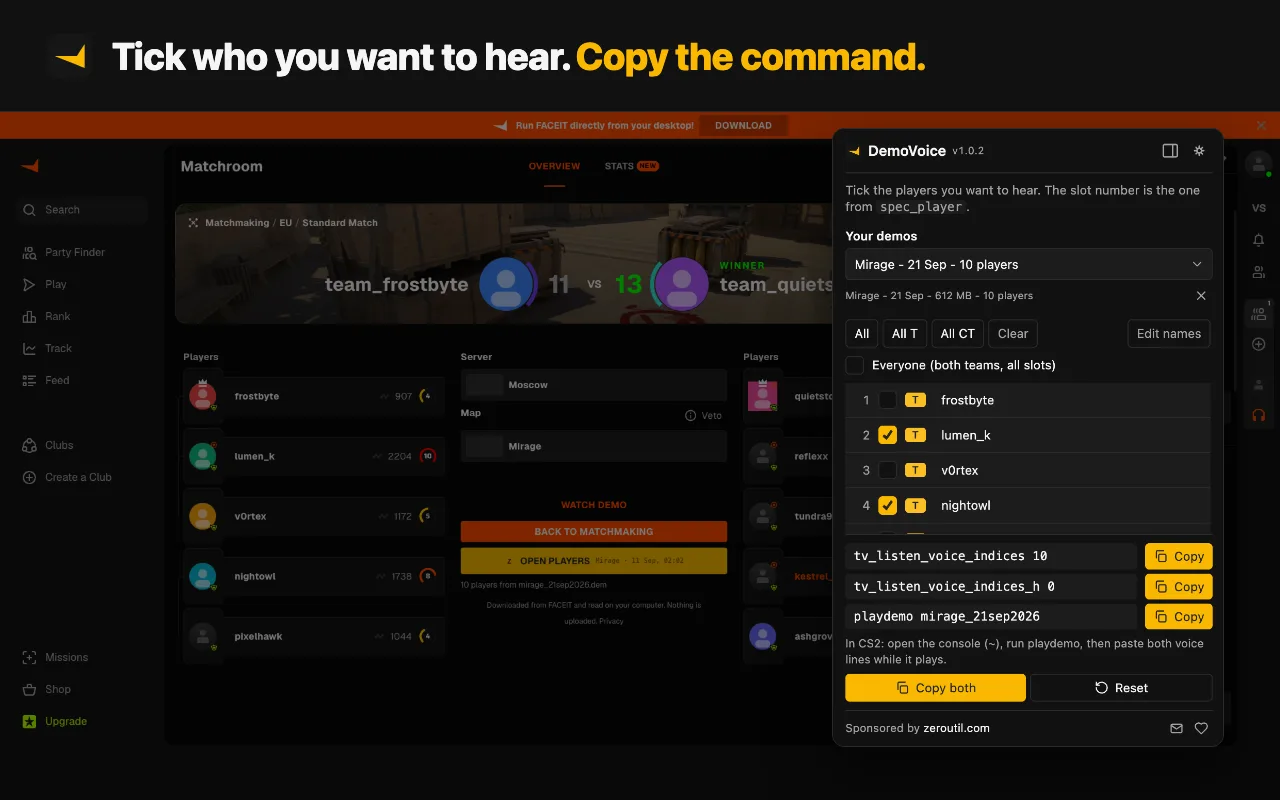
DemoVoice does steps 1 to 4 from the FACEIT match room: the demo it fetches is the one that recorded both sides, and it lists every player with their team, so 'the other five' is five ticks rather than a guess.
Sources
Every number in this article traces to a source below. Where a claim could not be sourced, it was cut rather than softened.
- Peer-reviewedAkiVer
That Valve matchmaking demos contain no voice audio data at all, stated as a standing warning by the author of the tool that extracts voice tracks from CS:GO and CS2 demos.
- Peer-reviewedb0ink
That CS2's SourceTV does not record player voice chat by default unless the server has sv_alltalk 1, and that the fix is a plugin that modifies SourceTV's own voice flags so it hears the voices of all players.
- ReportingFUNPLAY
The convar's own description string as shipped in CS2 - that sv_alltalk lets players hear all other players' voice communication with no team restrictions - which is the behaviour that is off during a normal match.
- Primary sourceCS Demo Manager
That the value is one bitmap split into two 32-bit halves, the low one for ids 0 to 31 and the high one for ids 32 to 63, as implemented by the demo tool that generates these commands.
- Primary sourceCS Demo Manager
The voice_ct, voice_t and voice_STEAMID64 aliases, and that the team aliases refer to each player's starting side rather than their current one.
- Primary sourceFACEIT
The exact three-command recipe FACEIT tells players to paste when reviewing a FACEIT demo, and that FACEIT demos carry the voice comms that recipe unmutes.
Topics
Tools mentioned in this article
- CS2 Voice Comms Calculator - Hear specific players in a CS2 or FACEIT demo - upload it to auto-fill players and get the tv_listen_voice_indices commands.
- CS2 Crosshair Code Decoder - Decode a CSGO-xxxxx crosshair share code into cl_crosshair console commands.
- CS2 Sensitivity Converter - Convert mouse sensitivity between CS2, Valorant, Apex and more, with eDPI and cm/360.
- SteamID Converter - Convert between SteamID64, STEAM_0:Y:Z, SteamID3 [U:1:W], account ID and profile URL.
Get new tools by email
New tools and the occasional deep-dive, about once a month. No spam, no sharing your address, unsubscribe in one click.